
Agents Keeper: a desktop app for Claude Code and Codex, on macOS, Windows and Linux All your agents. In one place.
Agents Keeper finds every Claude Code and Codex session on your computer, even the ones you started in another terminal. It tells you which one needs you, opens any session you describe, and shows your plan limits and roughly what it all costs. Local. No account.
Free beta · Apple silicon and Intel · notarized by Apple
Version 0.3.0-beta.4 · What's new
Describe any theme. Your terminal becomes it.
Describe any theme: “a purple ghost watching from the shadows”, “a football player in a #10 shirt”… Your own Claude Code or Codex picks sixteen colours, checks their contrast and draws a pixel picture beside your session. On your computer (on a Mac, in a sandbox).
A live mock of a session in each example theme. In the app, Describe makes the colours and the picture for you.
Pets, too.
A pixel pet walks along your Inbox and reacts to your sessions. These are examples: describe your own and it’s drawn for you.
- Purple ghost
- Red dragon
- Puppy
- Shih tzu
- Describe your own“a sleepy otter in a raincoat”
Example themes and pets are original drawings. What you make stays on your computer.
Run more Claude Code and Codex agents. Babysit fewer.
Every session on your computer. Wherever you started it.
Started in iTerm, Ghostty, VS Code or here? Agents Keeper finds it. Quit the app and your agents keep working on a durable session you can attach to from any terminal.
It says who needs you. And why it thinks so.
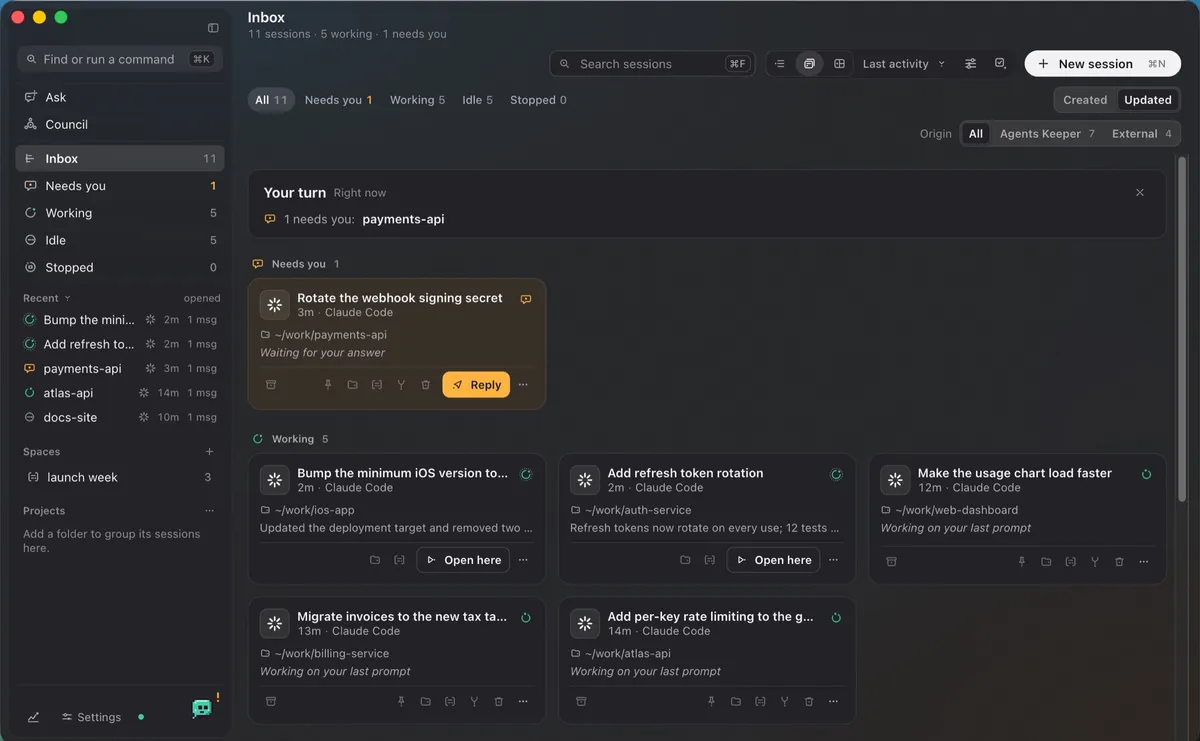
Needs you, Working, Idle, Paused, Stopped. Every state can explain the signal that decided it, so you never have to guess. It alerts once, on the change, then stays calm.
Your computer stays yours. Nothing changes without a yes.
Agents Keeper writes nothing outside its own folder without your consent. Risky actions wait for your yes, and sensitive actions land in an audit log on your computer. On a Mac, that yes is a native macOS dialog, and any session can run in a macOS sandbox.
Agents Keeper would like to add a shell hook to
~/.zshrcSee what they cost. Before Thursday surprises you.
Approximate cost and cache savings across Claude and Codex, and a meter for your 5-hour and weekly windows with the reset time, so you can pace a long week.
Just shipped. Already in the app.
Ask
Describe a session the way you remember it, by topic, folder, branch or date, and Ask opens it. Turn it on and it searches inside conversations too.
Council
Put one question to two to five agents. They answer alone, review each other anonymously, and a chair writes the verdict. They can't change your files.
Spaces
Group sessions that share a context, whatever folder they run in. Drag them in, or use Move to Space.
Cards
See sessions as cards with status tabs and the Claude or Codex logo, and reply right from the card.
Preview
Every live session shows its real terminal. Click one and type.
A calmer Inbox
Sessions you haven't touched in 2 hours step aside (you choose the time). Those that need you stay, and the Dock badge counts them.
Studio
Pick the app's look and accent color, set your terminal's colors and background picture, and describe, draw or import a pet.
It updates itself
From 0.3.0-beta.3, new versions download in the background. You choose when to restart, and your agents keep running.
And yes, there's a pet.
Describe one and your own Claude Code or Codex draws it, on your computer (on a Mac, in a sandbox with no access to your code). Or draw it yourself, pixel by pixel. It hops when an agent needs you, then settles, and naps when nothing is going on. Click it to see what's happening.
Example pets are original characters. Packs you make stay on your computer and are private by default.
A Claude Code app in three steps. No account.
Download and open
No sign-up and no login wall. On a Mac, a signed, notarized app whose background service is listed in Login Items. On Windows, an installer; its background service runs natively and starts when you sign in. On Linux, a .deb or an AppImage; its background service is a systemd user service. Your agents keep running when the app is closed.
It finds your sessions
It reads your existing Claude Code and Codex sessions and lists them. Nothing is changed, and your conversations stay on your computer.
Work from the inbox
Answer the agent that needs you, review what finished, start new ones. Close the app; they keep running.
Why not just tmux? Here's the difference.
Terminal tabs and tmux run Claude Code and Codex just fine. They don't tell you which agent is waiting for you, or what a week of agents cost. Agents Keeper runs the same command-line tools, with your own login, and adds what's missing.
| What you get | Terminal tabs | tmux | Agents Keeper |
|---|---|---|---|
| Claude Code and Codex side by side, in one list | One tab each | One window each | Yes |
| Sees the sessions you started in any terminal | No | Only its own | Yes |
| Agents keep running when you close the window | No | Yes | Yes |
| Tells you which agent needs you, and why | A bell, if your terminal shows one | Activity flags | Yes |
| Finds a session by topic, folder, branch or date | No | No | Yes |
| Shows plan limits and approximate cost | No | No | Yes |
| Runs the official Claude Code and Codex CLIs | Yes | Yes | Yes |
Claude Code's own desktop app also runs parallel sessions, each optionally in its own git worktree. Agents Keeper puts Claude Code and Codex in one list, includes the sessions you started in any terminal, and keeps them running when the app is closed. You can attach to any Agents Keeper session from a terminal. How to run multiple Claude Code and Codex agents · Agents Keeper vs the Claude Code and Codex apps
The best Claude Code and Codex managers, compared · Claude Code GUI apps · Claude Code app for Windows (native, no WSL) · Migrating from Conductor
Claude Code's agent view or Agents Keeper: how they compare · A dashboard for all your Claude Code agents
Claude Code and Codex questions, answered.
Agents Keeper is a free desktop app for macOS, Windows and Linux that keeps all your Claude Code and Codex sessions in one place. It finds every session on your computer, even the ones you started in another terminal, tells you which agent needs you, keeps your agents running in the background when you close the app, and shows your plan limits and roughly what it all costs. Agents Keeper (agentskeeper.com, also written AgentsKeeper) is not Keeper Security or AgentKeeper.
Yes. Agents Keeper runs the official Claude Code and Codex command-line tools you already use, with your own login. It never handles your tokens and never calls the APIs on your behalf.
Only inside its own folder. Anything outside it, like a shell hook or an agent config change, is shown first and needs your consent.
Your conversations stay on your computer, and the agents talk to Anthropic or OpenAI as they always do. Agents Keeper itself sends one anonymous daily check-in, on by default, which you can turn off in Settings › Privacy (see exactly what it sends). It also checks for updates to itself and to your agents.
No cookies and no third-party trackers. We count page views and downloads with the country, the referring site and campaign tags, so we know what's working. We never store your IP address. Read the details.
Nothing. Agents Keeper is free for everyone: download it and start, no sign-up needed. Leave your email only if you'd like news about new versions.
Intel Macs, yes: there is an Intel download next to the Apple silicon one, for Intel Macs from 2018 on. Both need macOS 14 Sonoma or later. The Intel build is new, so tell us if something goes wrong. Linux and Windows, yes: their downloads are in the download section, next to the Mac's. On Windows 10 (version 2004 or later) and 11 it runs natively, with no WSL, since version 0.5.2.
No. Agents Keeper is an independent app that works with their command-line tools.
On a Mac, from version 0.3.0-beta.3, Agents Keeper updates itself: a new version downloads in the background and you choose Restart to update. Your agents keep running. On a Mac with an older version, download the new one once and drag it into Applications. On Windows and Linux, each download in the download section says how it gets new versions.
Yes, that's what it's for. Start several Claude Code and Codex sessions side by side, each in its own durable terminal. The Inbox puts the ones that need you first, and they keep working when you close the app. How to run several agents at once.
tmux keeps sessions alive, and so does Agents Keeper. Agents Keeper also finds the sessions you started in any terminal, tells you which agent needs you and why, opens a session from what you remember about it, and shows your plan limits and cost. You can still attach to any Agents Keeper session from a terminal. Tabs, tmux and the makers' apps, compared.
Yes: since July 9, 2026, OpenAI's Codex app is part of the ChatGPT desktop app (macOS and Windows, Linux in preview), and Anthropic's Claude desktop app runs Claude Code. Agents Keeper gives you one list for Claude Code and Codex together, and local sessions that keep running in the background when the app is closed. It also lists the sessions you started in your own terminals. More for Codex users.
Your agents are waiting. Find out which one.
macOS
macOS 14 Sonoma or later. Apple silicon (M1 or later) or Intel (2018 or later).
Which Mac do you have? Apple menu › About This Mac: "Chip" means Apple silicon, "Processor" means Intel.
Signed and notarized by Apple. Open the .dmg and drag Agents Keeper into Applications.
Windows
Windows 10 (version 2004 or later) or 11, 64-bit (x64). Agents Keeper and its background service run natively on Windows: no WSL needed.
Signed by Microsoft, published by Nicolas Pinzon, and it updates itself. Open the Store page in your browser
Not code-signed yet: the next step shows what Windows will say and how to check the file.
Before you download: this file isn't signed yet
- The direct download isn't code-signed yet, so Windows can't tell who made it and shows "Unknown publisher". The Microsoft Store version is signed by Microsoft and shows Nicolas Pinzon as its publisher.
- When you open it, Windows SmartScreen says "Windows protected your PC". Click "More info", check the file name, then click "Run anyway".
- On a fresh Windows 11 with Smart App Control turned on, Windows may block the file completely, with no way to run it. If that happens, install Agents Keeper from the Microsoft Store instead.
- The Microsoft Store version updates automatically. The direct download doesn't update itself yet: get new versions from this page.
- Like any app installed in your user folder, a program already running as your Windows user could change its files: that is outside what Agents Keeper defends. Installing an older version over a newer one isn't blocked either, so download new versions only from this page.
Check the file before you run it
Its SHA-256 must match the one in SHA256SUMS, and SHA256SUMS and the .exe must verify with minisign and our public key. Run these in the folder you downloaded it to.
SHA-256: 4930e24a29d9005faee9d476d24f13b30c046d0d876a342d927f870bde15610e
First save the checksums and signatures in that folder, in PowerShell (their links below open them in the browser instead of saving them):
Invoke-WebRequest -UseBasicParsing https://downloads.agentskeeper.com/320abba2d86dcab008b4830324a9d778/SHA256SUMS -OutFile SHA256SUMS
Invoke-WebRequest -UseBasicParsing https://downloads.agentskeeper.com/320abba2d86dcab008b4830324a9d778/SHA256SUMS.minisig -OutFile SHA256SUMS.minisig
Invoke-WebRequest -UseBasicParsing https://downloads.agentskeeper.com/320abba2d86dcab008b4830324a9d778/AgentsKeeper-0.5.2-x64-win-setup.exe.minisig -OutFile AgentsKeeper-0.5.2-x64-win-setup.exe.minisig
SHA-256, in PowerShell (compare it with SHA256SUMS):
Get-FileHash .\AgentsKeeper-0.5.2-x64-win-setup.exe -Algorithm SHA256Signatures, with minisign (each must say "Signature and comment signature verified"):
minisign -Vm SHA256SUMS -P RWT8g3QUC5TrPI34aDQVnd/uio8xKO1HxdnJSaX5kO0YRkcyW0qcFdHD
minisign -Vm AgentsKeeper-0.5.2-x64-win-setup.exe -P RWT8g3QUC5TrPI34aDQVnd/uio8xKO1HxdnJSaX5kO0YRkcyW0qcFdHD
No minisign yet? Download the Windows zip from jedisct1.github.io/minisign and run minisign.exe from its folder.
SHA256SUMSSHA256SUMS.minisigSignature of the .exe (.minisig)
Older WSL2 version (legacy)
Before Agents Keeper ran natively on Windows, its background service ran in WSL2. That older version, 0.4.0-beta.5, stays here for anyone who needs it; it needs WSL2 (wsl --install), isn't code-signed either, and gets no new features.
Download the WSL2 version (AgentsKeeper-0.4.0-beta.5-x64-win-setup.exe)
SHA-256: a33ad17be2cb7a2beabb0018ef908a7df069370bec961fd0f5ebe051b31cf71f
SHA256SUMSSHA256SUMS.minisigSignature of the .exe (.minisig)
Linux
64-bit PC (x86_64): Ubuntu 22.04 or later, or Debian; tested on Ubuntu 24.04. The .deb is for Ubuntu and Debian; the AppImage runs on most other distributions.
On Ubuntu 24.04 and later, use the .deb: Ubuntu doesn't let an AppImage use the sandbox Agents Keeper runs in, so the AppImage won't start there.
The AppImage checks for updates and replaces itself. The .deb doesn't update itself yet: get new versions from this page and install them the same way.
Install
.deb, in the folder you downloaded it to (apt installs what it needs):
sudo apt install ./AgentsKeeper-0.4.0-beta.6-x64-linux.debAppImage: make it executable, then open it:
chmod +x AgentsKeeper-0.4.0-beta.6-x64-linux.AppImage
./AgentsKeeper-0.4.0-beta.6-x64-linux.AppImage
Check the files before you install them
Their SHA-256 must match the one in SHA256SUMS, and SHA256SUMS and each file must verify with minisign and our public key. Run these in the folder you downloaded them to.
AgentsKeeper-0.4.0-beta.6-x64-linux.deb: 4b9e174c1382e7731e5d8c10b1102bd918d4aeb6d62a3ce772bfbfccec12e366
AgentsKeeper-0.4.0-beta.6-x64-linux.AppImage: c1d8c5ffc450291177d680495b25ccb670fa631558b553a895918910554b09bf
First save the checksums and signatures in that folder (their links below open them in the browser instead of saving them):
curl -fL -o SHA256SUMS https://downloads.agentskeeper.com/cc9fe2b3701faffb338d84cd3fd789d1/SHA256SUMS \
  -o SHA256SUMS.minisig https://downloads.agentskeeper.com/cc9fe2b3701faffb338d84cd3fd789d1/SHA256SUMS.minisig \
  -o AgentsKeeper-0.4.0-beta.6-x64-linux.deb.minisig https://downloads.agentskeeper.com/cc9fe2b3701faffb338d84cd3fd789d1/AgentsKeeper-0.4.0-beta.6-x64-linux.deb.minisig \
  -o AgentsKeeper-0.4.0-beta.6-x64-linux.AppImage.minisig https://downloads.agentskeeper.com/cc9fe2b3701faffb338d84cd3fd789d1/AgentsKeeper-0.4.0-beta.6-x64-linux.AppImage.minisig
SHA-256 (it must print OK for each file you downloaded):
sha256sum -c SHA256SUMS --ignore-missingSignatures, with minisign (each must say "Signature and comment signature verified"):
minisign -Vm SHA256SUMS -P RWT8g3QUC5TrPI34aDQVnd/uio8xKO1HxdnJSaX5kO0YRkcyW0qcFdHD
minisign -Vm AgentsKeeper-0.4.0-beta.6-x64-linux.deb -P RWT8g3QUC5TrPI34aDQVnd/uio8xKO1HxdnJSaX5kO0YRkcyW0qcFdHD
minisign -Vm AgentsKeeper-0.4.0-beta.6-x64-linux.AppImage -P RWT8g3QUC5TrPI34aDQVnd/uio8xKO1HxdnJSaX5kO0YRkcyW0qcFdHD
No minisign yet? Install it with sudo apt install minisign, or get it from jedisct1.github.io/minisign.
SHA256SUMSSHA256SUMS.minisigSignature of the .deb (.minisig)Signature of the AppImage (.minisig)
On Windows? Use the Windows download instead: it runs natively, so you don't need these packages.