
How to run several Claude Code and Codex agents at once
By Nicolás Pinzón Aparicio · Updated
To run several Claude Code or Codex agents at once, give each one its own session and its own git worktree. tmux keeps sessions alive; Claude Code's built-in agent view (claude agents), the makers' apps (Claude Code's desktop app, Codex in OpenAI's ChatGPT desktop app) or Agents Keeper also show which agent is waiting for you.
Running two, five or ten coding agents side by side is normal now. Starting them is easy. The hard part is knowing which one is waiting for you, keeping them alive when a window closes, and stopping them from tripping over each other. This page compares the ways to do it, from plain terminal tabs to dedicated apps, and ends with a worktree workflow that works with all of them.
What goes wrong when you run many agents
Claude Code and Codex are command-line tools: each session lives in a terminal, works on one folder and keeps its own conversation. With one agent that's fine. With several, the same three problems show up:
- You miss the one that's waiting
- An agent asks a question or wants approval, then sits in a tab you aren't looking at until you notice. Meanwhile it does nothing.
- Closing a window ends the work
- Quit the terminal, close the laptop for an update, or restart, and every agent running inside it stops.
- Agents collide
- Two agents editing the same files in the same folder undo each other's changes, and a test run by one picks up the half-finished work of the other.
Every option below solves some of these. Which one fits depends on how many agents you run and for how long.
Parallel sessions or subagents?
There are two ways to get more than one agent working, and they solve different problems.
Subagents live inside one session. Claude Code can hand part of a task to a subagent that works in its own context and reports back, so the main conversation stays focused. You still talk to one session, about one task.
Parallel sessions are separate agents, each with its own task, its own conversation and usually its own folder. You might have one agent fixing a flaky test, another writing a migration and a third reviewing a pull request. That's what this page is about: several independent agents, and how to keep track of them.
The two combine well. Each parallel session can still use subagents for its own task.
Option 1: terminal tabs or split panes
Open one tab per agent and run claude or codex in each. It needs nothing new, and it's fine for two or three short tasks you are watching anyway.
The limits show up quickly: you cycle through tabs to see who's waiting, nothing tells you which tab needs an answer unless your terminal shows a bell, and quitting the terminal stops every agent in it.
Option 2: tmux, to keep agents alive
tmux keeps terminal sessions alive on their own, so an agent keeps working after you close the window or lose an SSH connection. It's the usual choice on a remote server.
- Start a named session for each agent:
tmux new -s api, then runclaude(orcodex) inside it. - Detach with Ctrl-b d. The agent keeps running.
- List what's running with
tmux ls, and come back withtmux attach -t api.
tmux solves survival, not attention. It can flag activity in a window, but it doesn't know that an agent is waiting for an answer, what a session was about, or how much of your plan it used. You still check each one by hand. More in tmux for AI agents.
Option 3: Claude Code's agent view (claude agents)
As of November 2026, the Claude Code CLI has its own screen for parallel sessions. Anthropic introduced agent view on May 11, 2026 (Claude Code v2.1.139) as a research preview, on the Pro, Max, Ultra, Team, Enterprise and Claude API plans. Run claude agents and you see all your background sessions on one screen, grouped as Ready for review, Needs input, Working and Completed.
- Start a session in the background from your shell with
claude --bg "fix the flaky settings test", or type the task in agent view and press Enter. Each prompt starts its own session. - To send the session you're in to the background, press ← on an empty prompt (or run
/bg). - Press Space on a row to peek at its latest output or question and reply, Enter to attach to the full conversation, and ← on an empty prompt to detach. Detaching never stops a session.
A separate supervisor process runs the sessions, so they keep working after you close the terminal. In a git repository, each session moves into its own worktree under .claude/worktrees/ before it edits files, so parallel sessions don't overwrite each other.
Keep in mind: it shows Claude Code sessions only, not Codex. Sessions run on your machine and stop if it shuts down, and each one uses your plan's quota on its own, so ten agents use it about ten times as fast. It's compared with other tools in the roundup of Claude Code and Codex managers, and side by side with Agents Keeper below.
Option 4: Agents Keeper, for Claude Code and Codex side by side
Agents Keeper is a free desktop app for macOS, Windows (native, no WSL) and Linux. Each session runs in a durable terminal kept by a background service, Agents Keeper Service, so your agents keep working when you close the app. You can open any of them in your own terminal with Attach. More ways to run Claude Code in the background.
It lists Claude Code and Codex sessions together, and it also finds the sessions you started elsewhere, in iTerm, Ghostty, VS Code or Terminal, and lists them without changing them. Every session has a status, such as Needs you, Working, Idle, Paused or Stopped, and can explain the signal that decided it. You get one notification when an agent needs you or finishes, never a repeating alarm (Claude Code notifications, with and without an app).
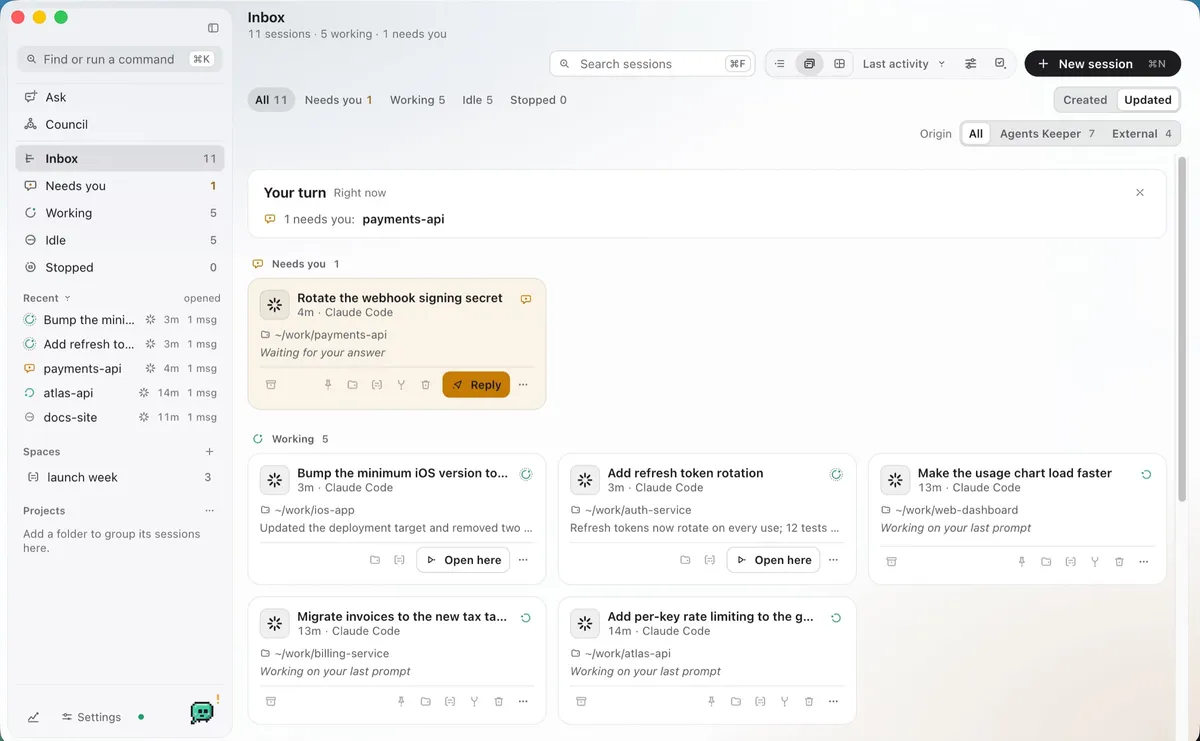
On top of that, Ask opens a session from what you remember about it (topic, folder, branch or date), Spaces group sessions by what they're for, and the Usage page shows your 5-hour and weekly limits and an approximate cost per agent, worked out on your computer.
Agents Keeper runs the official Claude Code and Codex tools with your own login. It never sees your password or tokens, and it never calls the APIs on your behalf.
See how it compares with tabs and tmux in the comparison table, or see what it does on Windows and Linux. Looking for a dashboard rather than tabs? See the Claude Code GUI and dashboard page.
Agent view or Agents Keeper: an alternative to Claude Code's agent view
If you're looking for an alternative to Claude Code's agent view, the short answer is: keep agent view for Claude Code's own background sessions in the terminal, and add a desktop app such as Agents Keeper when you also run Codex, want a window instead of a terminal screen, or need to see the sessions you started in other terminals. As of November 14, 2026, Anthropic's docs still call agent view a research preview.
Claude Code agent view (claude agents) | Agents Keeper | |
|---|---|---|
| Agents | Claude Code | Claude Code and Codex in one list |
| Where it runs | A screen inside the Claude Code CLI, in any terminal | A desktop app for macOS, Windows (native, no WSL) and Linux |
| Sessions it shows | Background sessions; interactive sessions open in other terminals appear only after you background them | Sessions started in Agents Keeper, plus the ones found in iTerm, Ghostty, VS Code or Terminal (Origin), listed without changing them |
| States | Ready for review, Needs input, Working, Completed (plus Pinned) | Needs you, Working, Idle, Paused, Stopped, each with the signal that decided it |
| Answering an agent | Peek with Space and reply, or attach with Enter | Reply or approve in the session, or Attach it to your own terminal |
| Notifications | While agent view is open, when a session needs input, finishes or fails | One per change when a session needs you or finishes, and a Dock badge on a Mac |
| Closing the window | A supervisor process keeps sessions running; they stop if the machine shuts down | The background service, Agents Keeper Service, keeps sessions running when the app is closed |
| Worktrees | Moves each session into its own worktree under .claude/worktrees/ before it edits files | Doesn't create worktrees: each session runs in the folder you pick |
| Usage | Each session uses your plan's quota on its own | A Usage page with your 5-hour and weekly limits and an approximate cost per agent |
| Price | Included with Claude Code | Free, no account |
Where agent view is the better pick: it's already installed with Claude Code, it works over SSH and anywhere a terminal does, and it isolates every background session in a worktree for you. If you only run Claude Code and live in the terminal, you may not need anything else.
What Agents Keeper adds: Codex next to Claude Code, the sessions you didn't start in it, a desktop window with Cards and a live Preview of every terminal, Ask to find a session by topic, folder or date, Spaces to group sessions, and the Usage page. The two work together: Agents Keeper runs the official claude you already use, so agent view keeps working alongside it. More on the dashboard side in Claude Code GUI and dashboard.
Option 5: Claude Code's own desktop app, and Codex in the ChatGPT desktop app
Anthropic's Claude desktop app runs parallel Claude Code sessions and OpenAI's ChatGPT desktop app, where the Codex app merged on July 9, 2026, runs parallel Codex chats, both with cloud options that keep going when your computer is off. If you use one agent family, its maker's app is a good fit: see the full comparison, with sources, and what Agents Keeper adds for Codex. Dedicated tools such as Conductor, Paradev (formerly Superset), Nimbalyst and Claude Squad are compared in the roundup of the best Claude Code and Codex managers.
A git worktree workflow for parallel agents
Whatever you use to run them, two agents editing the same checkout will collide. Git worktrees fix that: each agent gets its own folder on its own branch, and all of them share one repository, so there's no second clone to keep in sync. Here is the whole loop for one task:
- From your main checkout, create a folder and a branch for the task:
git worktree add ../myapp-retry -b retry-tuning. - Go there and install what the project needs (
npm install,uv sync…): dependencies and build output aren't shared between worktrees. - Start one agent in that folder and give it the task. In Agents Keeper, choose New session, pick the folder and the agent.
- Repeat for the next task with another folder and branch.
git worktree listshows them all. - When an agent is done, review its branch as you would anyone's: run the tests, read the diff, push and open a pull request.
- Once the branch is merged, remove the folder with
git worktree remove ../myapp-retryand the branch withgit branch -d retry-tuning.
Name the folders after the task, not the agent (myapp-retry, not myapp-agent2). The session list then tells you what each agent is doing at a glance.
Claude Code can also create and clean up the worktree itself: claude --worktree <name>. See Claude Code worktrees for the options, .env files and cleanup.
How many agents at once, and your plan's limits
There's no fixed number. Three things set it: how many tasks you can split cleanly into separate folders, how many answers and reviews you can keep up with, and your plan.
Every agent's work counts toward your Claude or ChatGPT plan, exactly as it would in a terminal, so ten agents use your limits faster than one. Plans have usage windows that reset over time. Agents Keeper's Usage page shows your 5-hour and weekly windows with the reset time, and an approximate cost per agent, so you can pace a long week instead of hitting the limit on a Thursday. More on Claude Code usage limits and how to check them.
A practical rule: add agents while you can still answer each one soon after it asks. When agents wait longer for you than they work, you're running too many.
Which option to pick
- Two or three quick tasks
- Terminal tabs are enough.
- Long tasks on a server or over SSH
- tmux, which you may already have.
- Claude Code only, in the terminal
- Agent view (
claude agents), built into Claude Code, with a paid Claude plan or an API key. - Claude Code only, in a graphical app
- Claude Code's desktop app, with a paid Claude plan.
- Claude Code and Codex, several at a time, on your own computer
- Agents Keeper: it keeps them running, tells you which one needs you and shows what they cost. It's free, and you can keep using your terminal alongside it.
Common questions about running several agents
- Can I run Claude Code and Codex at the same time?
- Yes. They're separate command-line tools with separate logins. In Agents Keeper you pick the agent for each session, and the Inbox shows both side by side.
- Does running several agents use more of my plan?
- Yes. Each agent's work counts toward your Claude or ChatGPT plan, as it would in a terminal. Agents Keeper's Usage page shows your 5-hour and weekly windows, with the reset time, so you can pace them.
- Do I need a git worktree for every agent?
- Only for agents that change files in the same repository. Agents that only read, or that work in different repositories, can share a folder or use their own. Claude Code's agent view creates a worktree for each background session on its own.
- Is there an alternative to Claude Code's agent view?
- Yes. Agent view (
claude agents) shows Claude Code's background sessions in the terminal. Agents Keeper is a free desktop app that lists Claude Code and Codex sessions together, including the ones running in your other terminals, and keeps them running when you close it. You can use both: see agent view or Agents Keeper. - Does Agents Keeper replace Claude Code or Codex?
- No. It runs the official tools you already use, with your own login. You need at least one of them; Setup can install them for you.
- Do my conversations leave my computer?
- Your conversations stay on your computer, and the agents talk to Anthropic or OpenAI as they always do. Agents Keeper sends one anonymous daily check-in, which you can turn off; the privacy page lists every field.
Sources
Checked on