
Claude Code worktrees: run parallel sessions on separate branches
By Nicolás Pinzón Aparicio · Updated
Run claude --worktree <name> (or claude -w <name>) and Claude Code creates a git worktree under .claude/worktrees/<name>/ on a new branch worktree-<name> and starts the session there, so each parallel session edits its own copy of the files; Agents Keeper is a free desktop app that keeps all those sessions, Claude Code and Codex, in one list and tells you which one needs you.
Two Claude Code sessions in the same folder will overwrite each other's work. A git worktree gives each session its own folder and branch while sharing one repository. As of November 11, 2026, Claude Code creates and cleans up worktrees itself; here is how that works, how to do it by hand when you need a specific branch, and how to keep track once you have several running.
Start Claude Code in a worktree with --worktree
Claude Code's docs describe a worktree as a separate working directory with its own files and branch, sharing the same repository history and remote as your main checkout. The --worktree flag (short form -w) creates one and starts the session in it:
- In your repository, run
claude --worktree feature-auth. Claude Code creates.claude/worktrees/feature-auth/at the repository root, on a new branchworktree-feature-auth, and starts the session there. - In another terminal, run it again with another name,
claude -w fix-login, for a second isolated session. Leave the name out and Claude Code picks one, such asbright-running-fox. - Add
.claude/worktrees/to your.gitignoreso the worktrees don't show up as untracked files in your main checkout. - Set up the project in each worktree (
npm install,uv sync…), or ask Claude to: a worktree is a fresh checkout, so dependencies and build output aren't there yet.
- First time in a folder
- Interactive runs need workspace trust: if you've never run Claude Code in the repository, run
claudethere once and accept the trust dialog, or--worktreeexits with an error. - Already in a session
- Ask Claude to "work in a worktree" and it creates one with its
EnterWorktreetool. - Not a git repository
--worktreeneeds git. For SVN, Perforce or Mercurial, Anthropic documentsWorktreeCreateandWorktreeRemovehooks that replace the git logic.
Which branch it starts from, .env files and pull requests
| What you want | How |
|---|---|
| Start from your current work, not from main | Set "worktree": { "baseRef": "head" } in your settings. The default, "fresh", branches from the remote's default branch |
Copy .env and other gitignored files into each worktree | List them in a .worktreeinclude file at the project root, in .gitignore syntax |
| Check out a pull request | claude --worktree "#1234" (quoted) or a GitHub pull request or GitLab merge request URL; it lands in .claude/worktrees/pr-1234 |
| Start from a specific existing branch | Create the worktree with git yourself (next section); baseRef doesn't take a branch name |
| Run a background session in its own worktree | claude --bg --worktree <name> |
Subagents can get worktrees too: ask Claude to "use worktrees for your agents", or add isolation: worktree to a custom subagent's frontmatter in .claude/agents/.
Cleaning up: what happens when you exit
When you exit an interactive worktree session, Claude Code checks the worktree before removing anything:
- Nothing changed
- For an unnamed session it removes the worktree and its branch on its own; a named session asks first.
- Changes or new commits
- It asks whether to keep or remove the worktree. Keep it and it prints the
claude --worktree <name> --resumecommand to come back later. Remove it and the directory, its branch and the work in them are deleted. - Runs with -p
- Non-interactive runs have no exit prompt, so their worktrees stay. Remove one with
git worktree remove(rungit worktree unlockfirst if git says it's locked).
Commit or push before you choose remove: removing deletes the worktree's branch along with the uncommitted work in it.
Worktrees by hand, for any agent
Plain git works for Claude Code, Codex or anything else, and it's the way to start from an existing branch or put the worktree outside the repository:
- New branch:
git worktree add ../myapp-retry -b retry-tuning. Existing branch:git worktree add ../myapp-bugfix fix-issue-456. - Go there, set up the project, and start the agent:
cd ../myapp-retrythenclaude(orcodex). git worktree listshows every worktree;git worktree remove ../myapp-retryremoves one when its branch is merged, andgit branch -d retry-tuningdeletes the branch.
Git won't check out the same branch in two worktrees at once, so give every task its own branch. A worktree shares the repository's .git with the main checkout, so commits made in one are visible from the others.
In the apps: the Claude desktop app has a Worktree switch, off by default, that runs a new session in its own worktree under .claude/worktrees/; Codex in OpenAI's ChatGPT desktop app (the Codex app merged into it on July 9, 2026) can also give each chat its own Git worktree.
Keeping track of parallel worktree sessions with Agents Keeper
Worktrees solve file collisions, not attention: with four sessions on four branches you still have to notice which one is waiting for an answer. Agents Keeper is a free desktop app for macOS, Windows (native, no WSL) and Linux that runs the official Claude Code and Codex with your own login and keeps every session in one list.
- Create the worktrees, with
claude --worktreeorgit worktree add. - In Agents Keeper, choose New session, pick the worktree's folder and the agent, Claude Code or Codex, and give it the task.
- Repeat for each branch. The Inbox groups the sessions by status, Needs you on top, and you get one notification when an agent needs you or finishes.
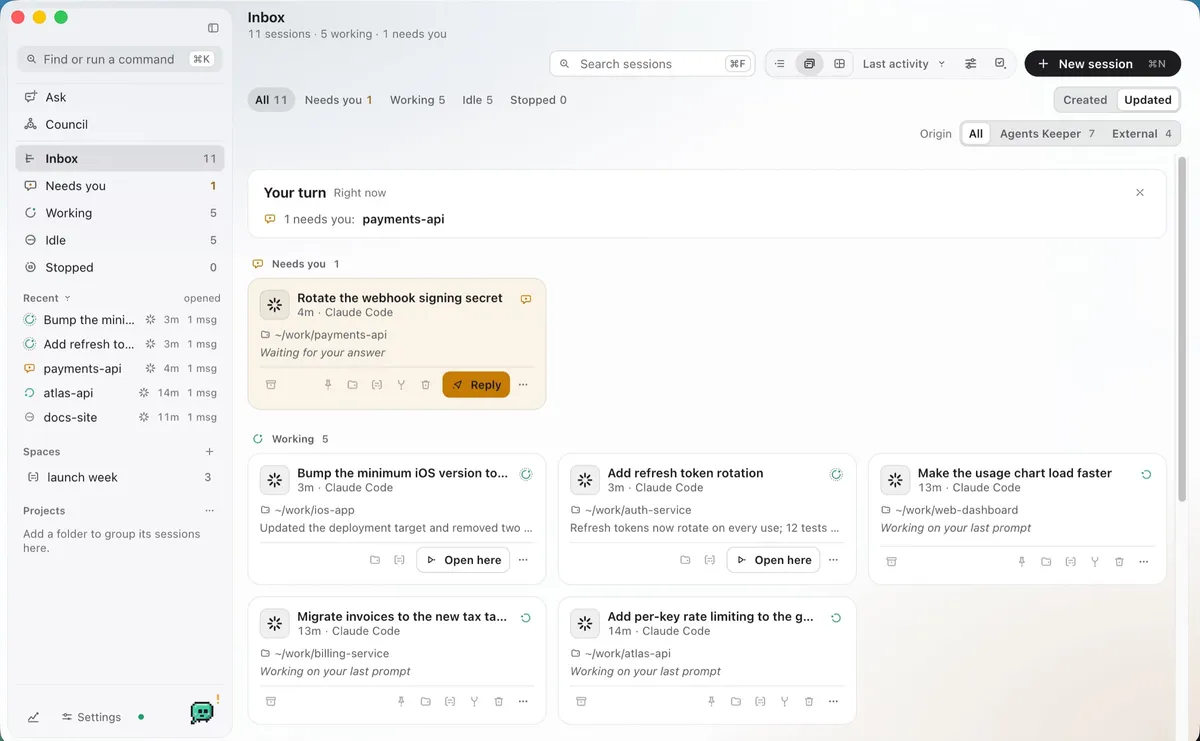
Agents Keeper doesn't create worktrees for you: it runs each session in the folder you choose, so any worktree works as usual. Sessions keep running in its background service when you close the window. The full loop is in how to run multiple Claude Code agents.
Questions about Claude Code worktrees
- How do I use git worktrees with Claude Code?
- Run
claude --worktree <name>. Claude Code creates the worktree under.claude/worktrees/<name>/on a branchworktree-<name>and starts the session in it. Or create one withgit worktree addand runclaudeinside it. - Where does Claude Code put worktrees?
- In
.claude/worktrees/at the repository root. Add that folder to.gitignore. The desktop app uses the same place by default and lets you change it in Settings. - Does the worktree get my .env file?
- Not by default: a worktree is a fresh checkout. List gitignored files such as
.envin a.worktreeincludefile at the project root and Claude Code copies them into each new worktree. - How do I go back to a worktree session?
- When you exit and keep the worktree, Claude Code prints a
claude --worktree <name> --resumecommand. Resuming a session that ended inside a worktree also takes it back there. - Can Codex use the same worktrees?
- Yes. A worktree is just a folder on its own branch, so you can run
codexin one. Agents Keeper runs Claude Code and Codex sessions side by side in whichever folders you pick. How the two agents differ: Claude Code vs Codex. - Is Agents Keeper free?
- Yes. Agents Keeper is a free beta with no account. Claude Code and Codex use your own Claude or ChatGPT plan, or an API key.
Sources
Checked on
- Anthropic: Run parallel sessions with worktrees (--worktree, .worktreeinclude, cleanup)
- Anthropic: Use Claude Code Desktop
- Anthropic: Manage multiple agents with agent view
- OpenAI: Worktrees in Codex
- OpenAI: What's new in Codex ("Use Codex in the ChatGPT desktop app", July 9; "Use the ChatGPT desktop app on Linux", preview, August 2026)
- Git documentation: git-worktree