
How to see all your Claude Code sessions (and resume an old one)
By Nicolás Pinzón Aparicio · Updated
Run claude --resume and press Ctrl+A to list your Claude Code sessions from every project on the computer, then Enter to resume one; Agents Keeper is a free desktop app that also shows the sessions running right now in other terminals, with Codex sessions in the same list.
Claude Code saves every conversation on your computer, but it only shows you the ones from the folder you're in unless you ask for more. This page explains, as of November 11, 2026, where those sessions live, how to find and resume them by hand, and what each tool can and can't see.
Where Claude Code keeps your sessions
A Claude Code session is a saved conversation tied to a project folder. Anthropic's docs say the CLI stores each one as a JSONL file at ~/.claude/projects/<project>/<session-id>.jsonl, where <project> is the folder's path with every non-alphanumeric character replaced by -.
Two details catch people out. Transcripts are kept for 30 days by default (the cleanupPeriodDays setting changes it). And the Claude desktop app, claude.ai/code and the VS Code extension each keep their own session list, so a session started in one of them doesn't show up in the others.
Anthropic says the file format is internal and changes between versions. Read the files if you want, but don't build scripts on them: use /export or claude -p --resume instead.
The manual way: list and resume sessions in the CLI
cdinto the project and runclaude --continue(orclaude -c) to reopen the most recent session in that folder.- Run
claude --resumewith no argument, or/resumeinside a session, to open the session picker. Each row shows the session's name or title, how long ago it was active, its git branch and its size. - In the picker, press Ctrl+A to show sessions from every project on the computer, Ctrl+W for every worktree of the repository, Ctrl+B to filter by the current branch, Space to preview and / to search.
- Press Enter to resume. A session from an unrelated project isn't opened in place: Claude Code copies a
cdand resume command to your clipboard instead. - To go straight to one session, run
claude --resume <name>orclaude --resume <session-id>. An ID works from any folder.
Name sessions so you can find them later: claude -n auth-refactor at the start, /rename during a session, or Ctrl+R in the picker. Sessions you don't name get a generated title that also works with --resume.
What the picker leaves out: sessions started with claude -p or the Agent SDK, and sessions whose first prompt was /loop. You can still resume them by ID.
Sessions that are running right now
The picker shows saved conversations. For what's running, Claude Code's agent view (claude agents) lists every background session across your projects, with what needs your input and what's done. Anthropic's docs are explicit about the limit: interactive sessions you have open in other terminals don't appear there until you send them to the background with /bg. How it compares with a desktop list: agent view or Agents Keeper.
Codex has its own command: codex resume reopens a recent chat from the current repository or searches across your local chats. Claude Code's picker doesn't list Codex chats, and Codex doesn't list Claude Code sessions.
Every session in one list with Agents Keeper
Agents Keeper is a free desktop app for macOS, Windows (native, no WSL) and Linux. It finds every Claude Code and Codex session on your computer, including the ones you started in iTerm, Ghostty, VS Code or Terminal, and lists them without changing them. Sessions found elsewhere are marked with where they run, like External · iTerm, and you can read them right away.
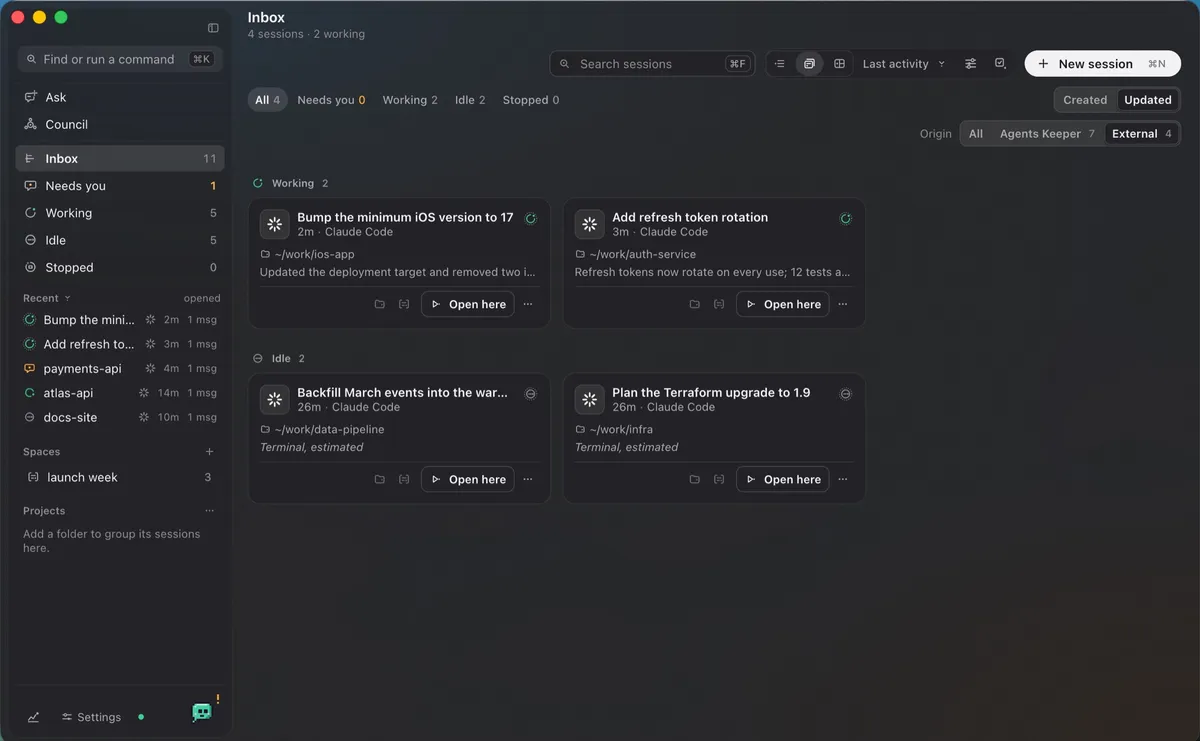
- Find a session by what you remember
- Ask knows every session on the computer and finds one by title, folder, branch, first message and date; say “open the last session about” a topic. ⌘K (Ctrl+Shift+K on Windows and Linux) finds any session, project, file or command.
- Continue it
- Open here starts a branch of the conversation in Agents Keeper and the original keeps running where it is; Move here closes it there and continues the same conversation here. A stopped session can be resumed from its row.
- See which one needs you
- Each session has a status, such as Needs you, Working or Idle, and you get one notification when an agent needs you or finishes.
Agents Keeper runs the official Claude Code and Codex tools with your own login. It never sees your password or tokens.
Step by step: bring in a session from another terminal. Running several at once? See how to run multiple Claude Code agents, or the Claude Code dashboard options.
Questions about Claude Code sessions
- Where is Claude Code's session history stored?
- In
~/.claude/projects/, one folder per project and one.jsonlfile per session, according to Anthropic's docs. SettingCLAUDE_CONFIG_DIRmoves it. - How do I see Claude Code sessions from all projects?
- Run
claude --resumeand press Ctrl+A in the picker. Press it again to go back to the current repository. - How long does Claude Code keep old sessions?
- 30 days by default. Change it with
cleanupPeriodDaysinsettings.json. - Why doesn't my session show up in /resume?
- The picker starts with the current folder only (Ctrl+A widens it), and it leaves out
claude -p, Agent SDK and/loopsessions. Sessions from the desktop app or the VS Code extension are in their own lists. - Can I see the Claude Code sessions running in my other terminals?
- Agent view shows background sessions only. Agents Keeper lists the sessions running in your other terminals too, Claude Code and Codex, and can open them here.
- Is Agents Keeper free?
- Yes. Agents Keeper is a free beta with no account. Claude Code and Codex use your own Claude or ChatGPT plan, or an API key.
Sources
Checked on