
A desktop app for Codex and Claude Code
By Nicolás Pinzón Aparicio · Updated
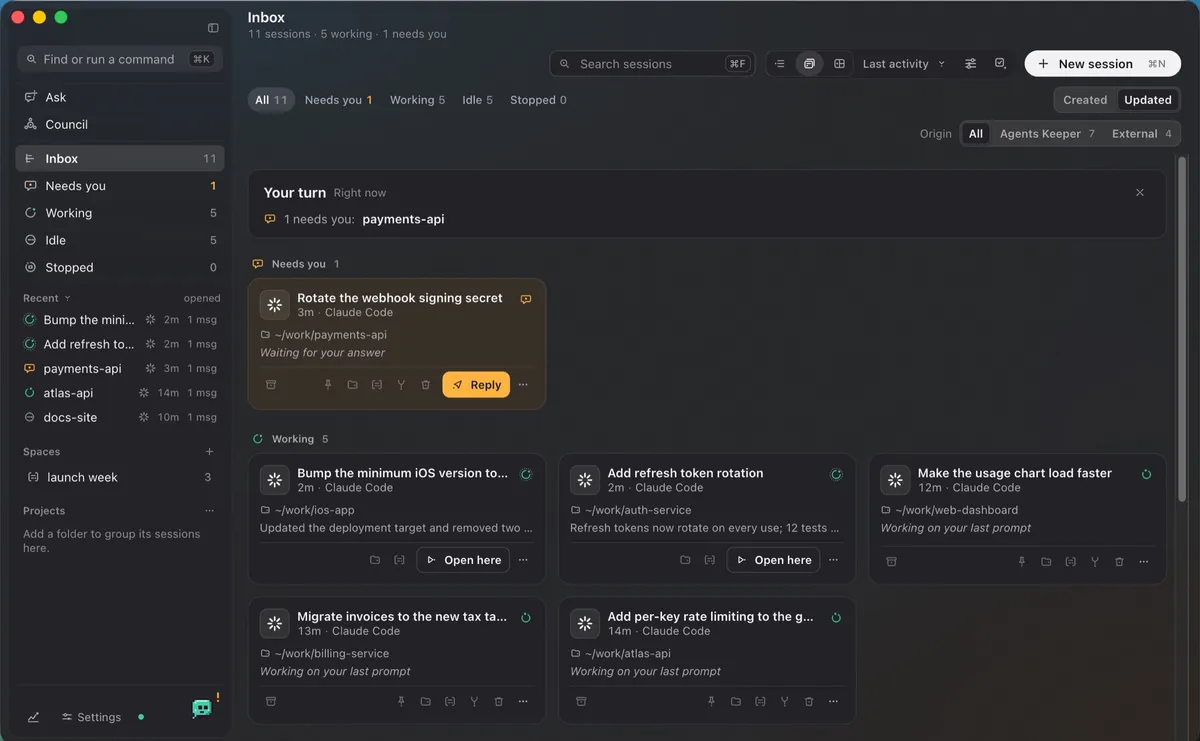
Agents Keeper is a free desktop app that runs the official Codex CLI with your own ChatGPT login, next to Claude Code, keeps your Codex sessions running in the background when the app is closed, and tells you which one needs you.
If you use Codex from the command line, you already know the routine: a terminal per task, and a habit of checking each one. Agents Keeper keeps that workflow, the same CLI, the same login and the same sessions, and adds a place to see all of them at once, next to your Claude Code sessions if you use both.
What Codex users get
- Codex and Claude Code in one list
- Pick the agent for each new session, Codex or Claude Code, and a model if you want a specific one. The Inbox and the Cards view show both, each with its logo.
- The sessions you already have
- Agents Keeper reads your existing Codex sessions and lists them, including the ones running in iTerm, Ghostty, VS Code or Terminal, without changing them. Open here starts a branch of a conversation in Agents Keeper; Move here moves it.
- Sessions that outlive the window
- Each session runs in a durable terminal kept by a background service, so Codex keeps working when you close the app. Attach opens any session in your own terminal.
- Which one needs you
- Every session has a status, such as Needs you, Working, Idle, Paused or Stopped, and can explain the signal that decided it. You get one notification when an agent needs you or finishes.
- Find a session by what you remember
- Ask opens a session by topic, folder, branch or date. Other questions go to your own Codex or Claude Code, which reads your sessions but never changes them.
- Your limits and an approximate cost
- The Usage page shows your plan limits and an approximate cost per agent, Codex included, worked out on your computer.
How it runs Codex
Agents Keeper doesn't replace Codex. It starts the official Codex command-line tool, the same one you run in a terminal, under your own login: your ChatGPT plan or an API key. It never sees your password or tokens and never calls OpenAI's API on your behalf. Codex talks to OpenAI as it always does.
Your conversations stay on your computer. Codex uses its own permission settings by default; on a Mac you can also run a session in a macOS sandbox by choosing Seatbelt under Advanced when you start it. Nothing is written outside Agents Keeper's own folder without your consent: a change to an agent's configuration is shown first, with the exact file.
Get started with Codex in Agents Keeper
- Download Agents Keeper from the download section and open it. No account.
- Setup shows whether Codex is installed and signed in. If it's missing, choose Install; then Sign in and finish in your browser with your ChatGPT plan or an API key.
- Your existing Codex sessions appear in the list. Sessions found in other terminals are marked with where they run, like External · iTerm.
- To start a new one, choose New session, pick the project folder and Codex, and type a first message if you like.
The guide covers each step: connect Claude Code or Codex, your first session and bring in a session from another terminal.
Choosing between the two, or using both? See Claude Code vs Codex: plans, Windows support, AGENTS.md and sessions, compared. To run both on one project, see use Claude Code and Codex together; on Windows, Codex CLI on Windows.
Codex on Windows and Linux
On Windows 10 (version 2004 or later) or 11, Agents Keeper runs natively since version 0.5.2 (November 13, 2026), with no WSL: it uses the Codex installed on Windows, and Setup offers to install it if it's missing. See Agents Keeper on Windows and the install guide.
On Linux, use the .deb on Ubuntu or Debian, or the AppImage elsewhere; the service runs as a systemd user service. See Claude Code and Codex on Linux.
What about the Codex app, now in ChatGPT?
OpenAI's Codex app merged into the ChatGPT desktop app on July 9, 2026, for macOS and Windows; a Linux version of that app has been in preview since August 2026. You choose Codex in the app and sign in with your ChatGPT account. Worktrees let Codex run several chats in the same project at once, and Codex Cloud runs tasks in cloud environments, so they keep going without your computer. OpenAI says the app is on every ChatGPT plan, including Free. If you only use Codex and want OpenAI's own interface, it's a good choice.
Agents Keeper fits a different case: one list for Codex and Claude Code together, local sessions that keep running in the background when the app is closed, and the sessions you start from your own terminals. The full comparison puts the two apps, Claude Code's desktop app and tmux side by side, and the roundup adds Conductor, Paradev, Nimbalyst, Claude Squad and newer tools.
Questions from Codex users
- Does it work with my ChatGPT plan?
- Yes. You sign in to Codex with your ChatGPT plan or an API key, as you would in a terminal, and Codex's work counts toward that plan.
- Can Codex and Claude Code work on the same question?
- Yes. Council puts one question to two to five members, each with its own agent and model, so Codex and Claude Code can answer side by side, review each other anonymously, and a chair writes the verdict. Council's agents can't change your files.
- Is it affiliated with OpenAI?
- No. Agents Keeper is an independent app that works with the Codex command-line tool. Codex is a trademark of OpenAI.
- Is it free?
- Yes. The beta is free and needs no account. Codex itself uses your own plan.
- Can I run several Codex agents at once?
- Yes, as many sessions as you start, each in its own durable terminal. For keeping them out of each other's way, see how to run several agents at once.
Sources
Checked on
- OpenAI: Codex CLI (GitHub)
- OpenAI: ChatGPT desktop app (Codex)
- OpenAI: ChatGPT desktop app for Linux (preview)
- OpenAI: What's new in Codex ("Use Codex in the ChatGPT desktop app", July 9; "Use the ChatGPT desktop app on Linux", preview, August 2026)
- OpenAI: Codex manual, including "Use Codex in the ChatGPT desktop app" (July 9)
- OpenAI: Worktrees in Codex
- OpenAI: Codex pricing