
Claude Code vs Codex: the differences that matter day to day
By Nicolás Pinzón Aparicio · Updated
Claude Code is Anthropic's coding agent and needs a paid Claude plan (Pro, $20 a month, or higher) or an API account, while Codex is OpenAI's open-source (Apache-2.0) coding agent included in every ChatGPT plan, Free included; both run in the terminal on macOS, Windows and Linux, read an instructions file (CLAUDE.md, or AGENTS.md for both), and resume old sessions, and Agents Keeper is a free desktop app that runs the two side by side.
Which one writes better code changes with almost every model release, so this page leaves benchmarks out. It compares what changes slowly and what you notice every day: what you pay, how you install it, how it runs on Windows, where it reads your project's rules, and how it handles sessions and parallel work. Facts from Anthropic's and OpenAI's own docs and pricing pages, checked on November 11, 2026.
Claude Code and Codex at a glance
| Claude Code | Codex CLI | |
|---|---|---|
| Made by | Anthropic | OpenAI; open source under Apache-2.0 |
| Plans that include it | Pro, Max, Ultra, Team, Enterprise, or a Console (API) account; not the free plan | Every ChatGPT plan: Free, Go, Plus, Pro, Business, Edu and Enterprise; or an API key |
| Individual prices | Pro $20/month ($17 billed annually), Max $100, Ultra $200 | Free $0, Go $8, Plus $20, Pro from $100 |
| Install (macOS, Linux) | curl -fsSL https://claude.ai/install.sh | bash | curl -fsSL https://chatgpt.com/codex/install.sh | sh |
| Install (Windows PowerShell) | irm https://claude.ai/install.ps1 | iex | irm https://chatgpt.com/codex/install.ps1 | iex |
| Package managers | Homebrew, WinGet, apt, dnf, apk, npm | npm, Homebrew |
| On Windows | Native or inside WSL; sandboxing needs WSL2 | Native in PowerShell with a Windows sandbox; WSL if you need Linux tooling |
| Project instructions | CLAUDE.md; reads AGENTS.md when there's no CLAUDE.md | AGENTS.md (32 KiB by default); other names only if you list them |
| Resume a session | claude --resume | codex resume |
| Check your plan limits | /usage | /status |
| Parallel work | claude --worktree, background sessions and agent view (claude agents) | Worktree chats in the ChatGPT desktop app (Codex); Codex Cloud tasks |
What you pay
Claude Code needs a Pro, Max, Ultra, Team or Enterprise plan, or a Console account billed per token; Anthropic's setup docs say the free Claude plan doesn't include it. On claude.com/pricing, Pro is $20 a month ($17 a month billed annually), Max $100 and Ultra $200. Claude Code shares the plan's limits with your Claude chats: see Claude Code usage limits.
Codex is included in every ChatGPT plan on OpenAI's pricing page, from Free and Go ($8 a month) to Plus ($20), Pro (from $100), Business, Edu and Enterprise. You can also sign in with an API key and pay API rates, which OpenAI suggests for automation such as CI.
If you already pay for one of the two, start there: both work with your existing subscription, and both can run side by side if you have both.
Installing them, and Windows
Both install with one command. Claude Code supports macOS 13+, Windows 10 1809+, Ubuntu 20.04+, Debian 10+ and Alpine 3.19+. Codex's GitHub releases cover macOS and Linux on x64 and ARM64, and it has its own Windows installer.
On Windows the two differ. Anthropic lets you run Claude Code natively from PowerShell or CMD, or inside WSL, and its table says sandboxing works only in WSL2. OpenAI's Windows page says Codex can run natively in PowerShell with a Windows sandbox, recommends that by default, and suggests WSL when you need Linux tooling or already work in WSL2. Windows 11 is OpenAI's recommended baseline.
Step by step for Codex: Codex CLI on Windows. Want both in one Windows app? See Claude Code and Codex on Windows.
CLAUDE.md vs AGENTS.md
Each agent reads a Markdown file of project rules at the start of a session. Codex reads AGENTS.md (and AGENTS.override.md), from ~/.codex and from each folder between the Git root and where you started it, up to 32 KiB by default. Running /init in Codex writes one for you.
Claude Code reads CLAUDE.md. Since version 2.1.277, Anthropic's docs say it also reads AGENTS.md as your project instructions when there's no CLAUDE.md in the folder or above it. To keep one set of rules for both agents, write AGENTS.md and either leave CLAUDE.md out or import AGENTS.md from it.
Sessions, background work and parallel agents
- Coming back to old work
claude --resumeopens Claude Code's session picker;codex resumereopens a recent Codex chat from the current repository or searches your local chats. Neither lists the other's sessions. More in Claude Code sessions.- Working with the terminal closed
- Claude Code has background sessions:
claude --bgand agent view (claude agents). For Codex in a terminal, tmux does the job. See run Claude Code in the background. - Several tasks at once
claude --worktree <name>gives each Claude Code session its own git worktree and branch; Codex in the ChatGPT desktop app (where the Codex app merged on July 9, 2026) can put each chat in its own worktree, and Codex Cloud runs tasks remotely. See Claude Code worktrees.
Using both: Claude Code and Codex side by side in Agents Keeper
Plenty of people keep both: one for the work it's better at this month, the other when a plan's limit runs out. (Setups for running them on one project: use Claude Code and Codex together.) The cost is two sets of terminals, two session lists and two usage meters. Agents Keeper is a free desktop app for macOS, Windows (native, no WSL) and Linux that runs the official Claude Code and Codex with your own login, in one place.
- One list
- Every Claude Code and Codex session in one Inbox, grouped by status, with the ones that need you on top and one notification when an agent needs you or finishes.
- Both limits
- The Usage page shows your 5-hour and weekly windows with the reset time, and an approximate cost across Claude and Codex, worked out on your computer.
- Ask both
- Council puts one question to two to five members, each with its own agent and model, so Claude Code and Codex answer side by side, review each other anonymously, and a chair writes the verdict. Council's agents can't change your files.
- Running in the background
- Sessions of both agents keep running in its background service when you close the window.
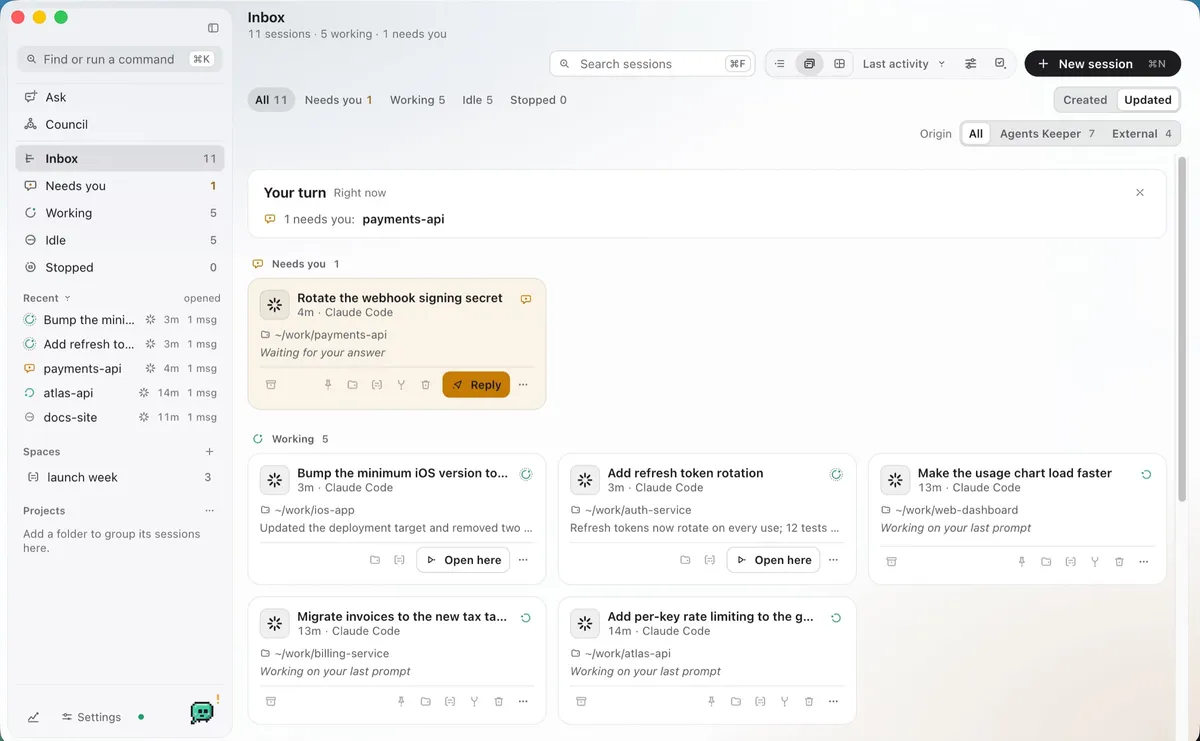
More on Agents Keeper for Codex users, and the Claude Code and Codex managers compared.
Questions about Claude Code vs Codex
- Is Claude Code better than Codex?
- It depends on the task and changes with each model release, so test both on your own repository. The fixed differences are plans and price, Windows support and instruction files: see the table above.
- Is Codex free?
- Codex is included in every ChatGPT plan, the Free plan too, per OpenAI's pricing page, with usage limits that depend on the plan. Claude Code isn't included in the free Claude plan.
- Can I use Claude Code and Codex on the same project?
- Yes. Give each its own git worktree so they don't edit the same files, and keep shared rules in
AGENTS.md, which both can read. - Does Codex read CLAUDE.md?
- Not by default. Codex reads
AGENTS.md; other file names are read only if you add them toproject_doc_fallback_filenamesin~/.codex/config.toml. - Is Agents Keeper free?
- Yes. Agents Keeper is a free beta with no account. Claude Code and Codex use your own Claude or ChatGPT plan, or an API key.
Sources
Checked on
- Anthropic: Set up Claude Code (native Windows or WSL)
- Anthropic: Claude plans and pricing
- Anthropic: How Claude remembers your project (CLAUDE.md and AGENTS.md)
- Anthropic: Manage sessions (resume, session picker, where transcripts are stored)
- Anthropic: Manage multiple agents with agent view
- Anthropic: Run parallel sessions with worktrees (--worktree, .worktreeinclude, cleanup)
- OpenAI: Codex CLI on GitHub (README, Apache-2.0)
- OpenAI: Codex CLI (codex resume)
- OpenAI: Codex pricing
- OpenAI: Custom instructions with AGENTS.md (Codex)
- OpenAI: Codex on Windows, the native Windows sandbox and WSL
- OpenAI: Worktrees in Codex
- OpenAI: ChatGPT desktop app (Codex)
- OpenAI: What's new in Codex ("Use Codex in the ChatGPT desktop app", July 9; "Use the ChatGPT desktop app on Linux", preview, August 2026)