
How to run Claude Code in the background (and keep it running)
By Nicolás Pinzón Aparicio · Updated
Start the task with claude --bg "your task" (or type /bg in a running session) and Claude Code's supervisor keeps it working with no terminal open, claude agents brings it back; tmux does the same for any terminal program, and Agents Keeper is a free desktop app whose background service keeps your Claude Code and Codex sessions running when you close it.
An interactive Claude Code session lives inside its terminal window, so closing the window ends the work. As of November 11, 2026 there are three ways around that: Claude Code's own background sessions, a terminal multiplexer like tmux, or an app with its own background service. Here is how each one works and where it stops.
Option 1: Claude Code's background sessions (agent view)
Claude Code has a background mode, part of agent view, which Anthropic introduced on May 11, 2026 as a research preview. Its docs say a background session is a full Claude Code conversation that keeps running without a terminal attached, run by a separate supervisor process.
- Start a task straight in the background:
claude --bg "investigate the flaky settings test". - Or move the session you're in: type
/bg(or/background), or press ← on an empty prompt. - Close the terminal if you like. Run
claude agentslater to see every background session, grouped by what's running, what needs your input and what's done, and open one to continue. - From your shell,
claude --resume <session>attaches to a background session that's still running.
- What stops it
- Shutting down or restarting the computer stops running background sessions; after a restart you continue each one from its saved conversation. Sleep alone doesn't: the supervisor reconnects on wake.
- Idle sessions
- A finished or waiting session left unattached for about an hour may have its process stopped. The conversation stays on disk and picks up where it left off when you reply; Ctrl+T pins a session to keep it running.
- What it covers
- Claude Code only, and only sessions you sent to the background: interactive sessions open in other terminals don't appear until you background them.
Option 2: tmux, for any terminal program
tmux is a terminal multiplexer: it keeps programs running in a session on the computer after you detach from it or close the window, and it's the usual answer on a server you reach over SSH. It works for Claude Code, Codex or anything else.
- Start a named session:
tmux new -s agent. - Run
claude(orcodex) inside it and give it the task. - Detach with Ctrl+B, then D. The agent keeps working; you can close the terminal.
- Come back with
tmux attach -t agent;tmux lslists your sessions.
Keep in mind: tmux doesn't tell you which session is waiting for you, and Claude Code's desktop notifications don't reach the outer terminal from inside tmux unless you turn on passthrough (see Claude Code notifications).
Option 3: Agents Keeper keeps Claude Code and Codex running
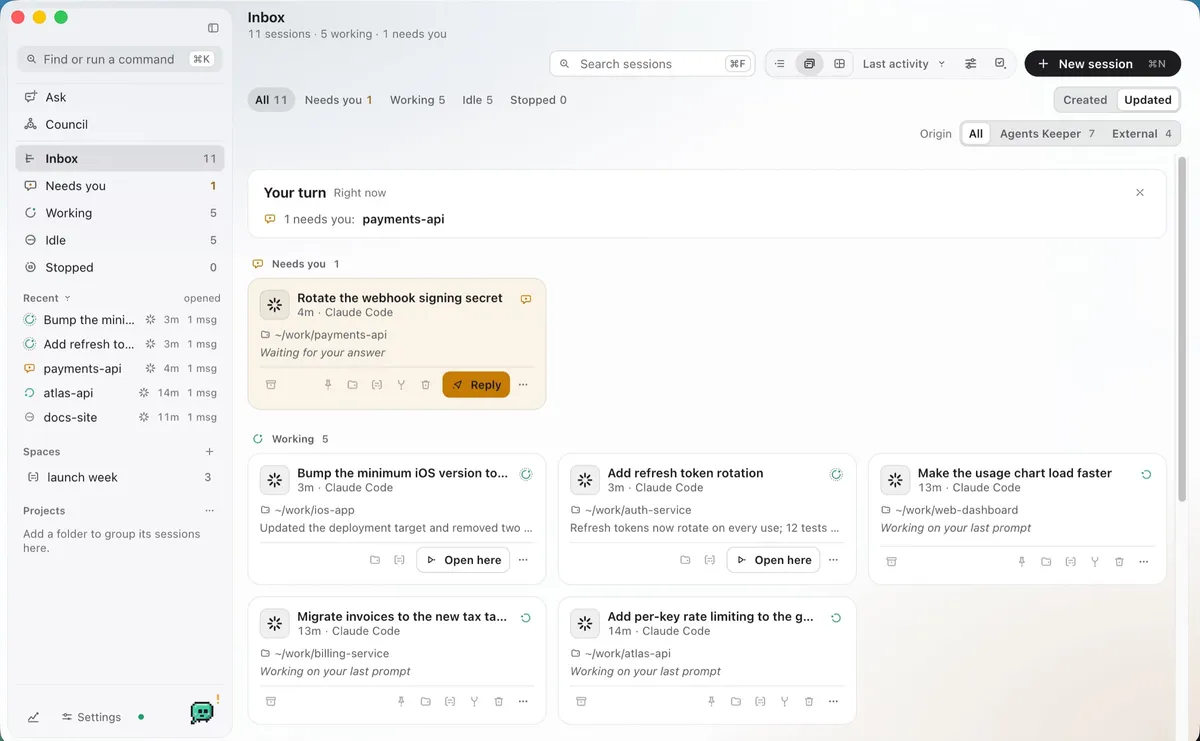
Agents Keeper is a free desktop app for macOS, Windows (native, no WSL) and Linux. Each session runs in a durable terminal kept by a background service, Agents Keeper Service, so your agents keep working when you close the window or quit the app. Open the app again and they're where you left them.
| System | Background service |
|---|---|
| macOS 14+ | Listed in Login Items |
| Windows 10 (2004+) and 11 | Runs natively, no WSL needed (since 0.5.2): the service starts when you sign in to Windows. The older WSL2 version stays available as a legacy download |
| Linux (.deb, AppImage) | A systemd user service |
- Back in your own terminal
- Open any session in your own terminal with Attach, in its Crew panel.
- Know when to come back
- Every session has a status, such as Needs you or Working, and you get one notification when an agent needs you or finishes.
- Updates don't interrupt
- On a Mac, new versions download in the background and you choose when to restart; your agents keep running.
Running several at once? See how to run multiple Claude Code agents, and the setup for Windows or Linux.
Questions about running Claude Code in the background
- Does Claude Code keep running if I close the terminal?
- Not a normal interactive session. A background session does: start it with
claude --bgor move it with/bg, and Claude Code's supervisor keeps it going without a terminal. - How do I get back to a background session?
- Run
claude agentsand open it, or runclaude --resume <session>from your shell. - Does it survive a restart or closing my laptop?
- Sleep, yes: Anthropic says sessions are preserved and the supervisor reconnects on wake. A shutdown or restart stops running sessions; you continue them from their saved conversation.
- Can I run Codex in the background too?
- With tmux, yes, like any terminal program. Agents Keeper keeps Codex sessions running in the background the same way as Claude Code ones.
- Is Agents Keeper free?
- Yes. Agents Keeper is a free beta with no account. Claude Code and Codex use your own Claude or ChatGPT plan, or an API key.
Sources
Checked on