
Claude Code notifications: get told when it needs you or finishes
By Nicolás Pinzón Aparicio · Updated
Claude Code already sends a desktop notification in Ghostty, Kitty and iTerm2; in any other terminal, add a Notification hook to ~/.claude/settings.json that runs your system's notify command, or use Agents Keeper, a free desktop app that notifies you once when any Claude Code or Codex agent needs you or finishes.
A long Claude Code task is only useful if you notice when it stops: to ask a question, to get approval, or because it's done. Here is what Claude Code does on its own as of November 11, 2026, how to set it up in terminals that stay silent, and how to cover many agents at once.
What Claude Code does on its own
When Claude finishes a task or stops at a permission prompt while you seem to be away, Claude Code fires a notification event. What you see depends on the terminal, according to Anthropic's terminal docs:
| Terminal | What you get by default |
|---|---|
| Ghostty, Kitty | A desktop notification |
| iTerm2 | A desktop notification, once you turn on its alerts (Settings → Profiles → Terminal → Notification Center Alerts) |
| Apple Terminal | A silent bell character at most: a window flash or Dock bounce if the profile allows it |
| Others, such as the VS Code terminal or Warp | Nothing |
To get the bell in any terminal, set "preferredNotifChannel": "terminal_bell" in ~/.claude/settings.json. Inside tmux, notifications don't reach the outer terminal until you add set -g allow-passthrough on to ~/.tmux.conf and set the channel to iterm2, kitty or ghostty.
The manual way: a Notification hook
A hook is a shell command Claude Code runs at a given moment. The Notification event fires when Claude is waiting for your input or permission, so it works in every terminal, alongside the built-in notification.
- Open
~/.claude/settings.json(create it if it doesn't exist). - Under
hooks, add aNotificationentry with"matcher": ""and a hook of"type": "command". - For the command, use your system's notifier. macOS:
osascript -e 'display notification "Claude Code needs your attention" with title "Claude Code"'. Linux:notify-send 'Claude Code' 'Claude Code needs your attention'(it needs a desktop notification daemon; installlibnotify-binon Debian and Ubuntu). Windows: a PowerShellMessageBox, as in Anthropic's hooks guide. - Run
/hooksin Claude Code to check that it's listed. On macOS, if nothing appears, allow notifications for Script Editor in System Settings → Notifications:osascriptsends them through it.
Want only some alerts? The matcher filters by type, for example permission_prompt or idle_prompt. For an alert every time Claude finishes a reply, use the Stop event instead; it fires at the end of every turn.
Background sessions: while Claude Code's agent view (claude agents) is open, it also notifies you when a background session needs your input, finishes or fails.
One notification for every agent with Agents Keeper
Hooks are per tool and per computer, and each terminal behaves differently. Agents Keeper is a free desktop app for macOS, Windows (native, no WSL) and Linux that keeps your Claude Code and Codex sessions in one list, and also lists the ones it finds in other terminals.
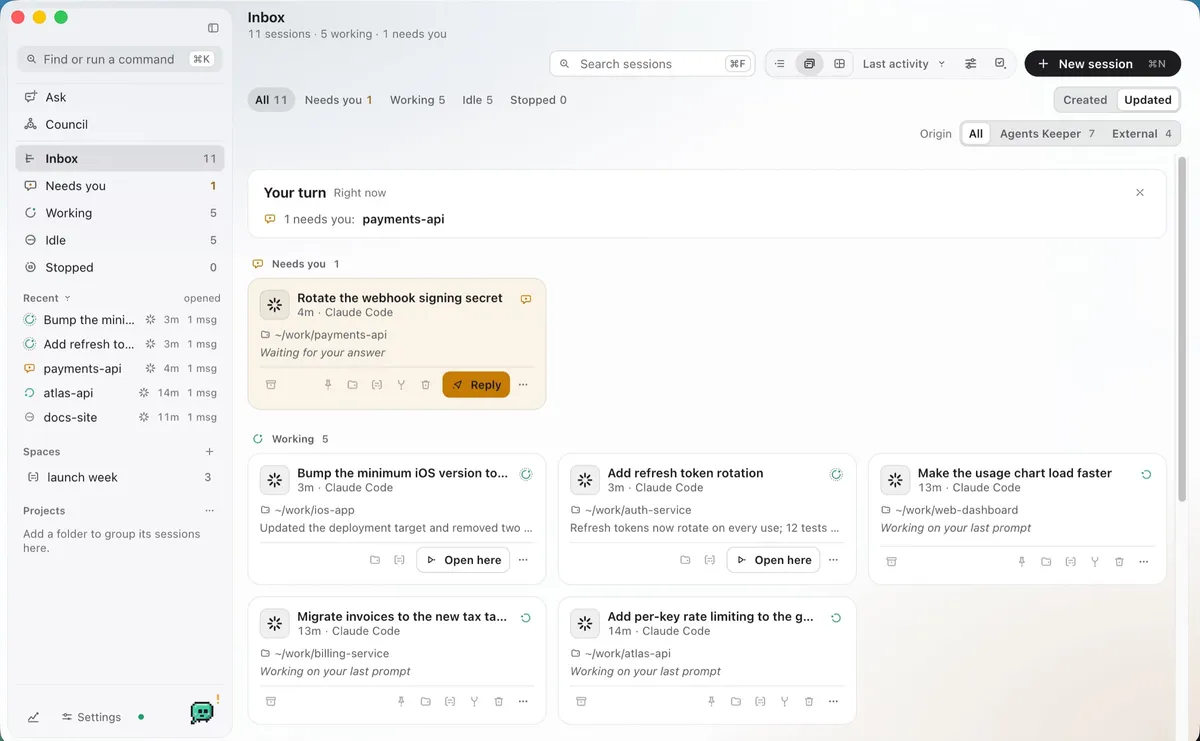
- One notification per change
- You get a notification when a session needs you or finishes, once per change, never as a repeating alarm. On a Mac the Dock badge counts the sessions that need you.
- Why it thinks so
- Every session has a status, Needs you, Working, Idle, Paused or Stopped, and Explain status says which signal decided it.
- What you missed
- At the top of the Inbox, Your turn sums up what happened while you were away and what needs you.
No hooks to write: Agents Keeper runs the official Claude Code and Codex tools with your own login, and anything it would change outside its own folder is shown to you first.
More in the guide: the Inbox and statuses. See also how to run multiple Claude Code agents.
Questions about Claude Code notifications
- Does Claude Code have notifications?
- Yes. It fires a notification event when it finishes or needs permission while you're away. Ghostty, Kitty and iTerm2 (with alerts on) show it as a desktop notification; other terminals need the bell setting or a hook.
- How do I get notified when Claude Code finishes?
- Add a
Stophook for an alert at the end of every reply, or aNotificationhook for when Claude waits for you. Both go in~/.claude/settings.json. - Why don't I get Claude Code notifications in VS Code?
- Anthropic's docs list the VS Code integrated terminal among those that get no desktop notification. Use a Notification hook, or set
preferredNotifChanneltoterminal_bell. - Do notifications work inside tmux?
- Only after you add
set -g allow-passthrough onto~/.tmux.confand setpreferredNotifChannelto your outer terminal (iterm2,kittyorghostty). - Can I get one alert for Claude Code and Codex together?
- Yes, with Agents Keeper: one notification when any session needs you or finishes, for Claude Code and Codex alike.
- Is Agents Keeper free?
- Yes. Agents Keeper is a free beta with no account. Claude Code and Codex use your own Claude or ChatGPT plan, or an API key.
Sources
Checked on