
Install Claude Code on Windows, with or without WSL
By Nicolás Pinzón Aparicio · Updated
As of November 2026, Claude Code runs natively on Windows 10 (version 1809 or later) and Windows 11 without WSL: open PowerShell, run irm https://claude.ai/install.ps1 | iex, open a new terminal and run claude; you only need WSL2 for sandboxed commands or Linux tooling. Agents Keeper, a free desktop app for several Claude Code and Codex sessions, also runs natively on Windows, with no WSL, since version 0.5.2 (November 13, 2026).
Claude Code used to need WSL on Windows. Anthropic's setup docs now list native Windows as a first-class option, with WSL2 for people who want the sandbox or a Linux toolchain. Here is each way to install it, with the commands from Anthropic's docs, checked on November 17, 2026.
Native Windows or WSL2: which to pick
| Native Windows | Inside WSL2 | |
|---|---|---|
| Install | irm https://claude.ai/install.ps1 | iex in PowerShell, the CMD installer, or winget install Anthropic.ClaudeCode | curl -fsSL https://claude.ai/install.sh | bash in the WSL terminal |
| Needs | Nothing else; Git for Windows is optional | WSL 2 turned on and a Linux distribution |
| Shell Claude uses | Git Bash if Git for Windows is installed, otherwise PowerShell | Your Linux shell |
| Sandboxed commands | Not supported: commands run unsandboxed | Supported (bubblewrap and socat) |
| Best for | Windows projects and tools | Linux toolchains, or when you want the sandbox |
Anthropic's requirements: Windows 10 version 1809 or later (or Windows Server 2019+), 4 GB of RAM or more, an x64 or ARM64 processor and an internet connection. WSL 1 also works, without the sandbox.
Install Claude Code natively, without WSL
- Open PowerShell (your prompt starts with
PS C:\) and runirm https://claude.ai/install.ps1 | iex. You don't need to run it as administrator. - In CMD instead (the prompt starts with
C:\withoutPS), runcurl -fsSL https://claude.ai/install.cmd -o install.cmd && install.cmd && del install.cmd. - Open a new terminal window and run
claude --version. A version number means it worked. - Go to your project folder and run
claude, then follow the browser prompts to sign in.
If you see The token '&&' is not a valid statement separator, you're in PowerShell running the CMD command; if 'irm' is not recognized, you're in CMD running the PowerShell one. If claude isn't found after installing, the install folder isn't on your PATH yet: open a new terminal first. claude doctor prints a read-only check of the installation and your settings.
With WinGet, winget install Anthropic.ClaudeCode installs it too, but that copy doesn't update itself by default: run winget upgrade Anthropic.ClaudeCode from time to time, or see “Update or uninstall” below. The native installer updates in the background.
Git for Windows: optional, and what it changes
Anthropic recommends installing Git for Windows on native Windows. With it, Claude Code runs shell commands in Git Bash (its Bash tool and Monitor tool need it), and the PowerShell tool stays available alongside. Without it, Claude Code runs shell commands through PowerShell.
If Claude Code can't find Git Bash, point it there in settings.json: "env": { "CLAUDE_CODE_GIT_BASH_PATH": "C:\\Program Files\\Git\\bin\\bash.exe" }. Inside WSL you don't need Git for Windows.
Install Claude Code inside WSL2
- Set up WSL2 once:
wsl --install -d Ubuntu-24.04in PowerShell, restart if Windows asks, then choose a Linux user name and password. - Open the WSL terminal (Ubuntu in Windows Terminal, or
wsl). - Run
curl -fsSL https://claude.ai/install.sh | bashthere, thenclaude. You install and launch it inside WSL, not from PowerShell or CMD.
On native Windows, Claude Code runs commands without its sandbox. Anthropic's sandbox works on macOS, Linux and WSL2 only; WSL 1 runs without it too. If you want an agent's commands fenced in, run Claude Code in WSL2.
Update or uninstall Claude Code on Windows
Updating. The native install (PowerShell or CMD) checks for updates when it starts and while it runs, installs them in the background and uses the new version next time you open it; claude update applies one right away. A WinGet install needs winget upgrade Anthropic.ClaudeCode, unless you set CLAUDE_CODE_PACKAGE_MANAGER_AUTO_UPDATE to 1: then Claude Code runs that upgrade for you and asks you to restart. Windows locks the running claude.exe, so if that upgrade fails while Claude Code is open, it shows you the command to run by hand. claude doctor shows the result of the last update attempt.
Uninstalling. For the native install, run in PowerShell: Remove-Item -Path "$env:USERPROFILE\.local\bin\claude.exe" -Force and Remove-Item -Path "$env:USERPROFILE\.local\share\claude" -Recurse -Force. For WinGet: winget uninstall Anthropic.ClaudeCode. Inside WSL, use the Linux commands: rm -f ~/.local/bin/claude and rm -rf ~/.local/share/claude. Your settings and session history stay in %USERPROFILE%\.claude and %USERPROFILE%\.claude.json; delete them only if you want a clean slate (the VS Code extension and the desktop app write there too).
Which plan you need
Claude Code needs a Claude Pro, Max, Ultra, Team or Enterprise plan, or a Console (API) account: the free claude.ai plan doesn't include it. It also works through Amazon Bedrock, Google Cloud or Microsoft Foundry. Prefer a window to a terminal? Anthropic's Claude desktop app has a Windows version (x64, with a separate ARM64 installer) whose Code tab runs Claude Code, natively or inside a WSL 2 distribution.
Several Claude Code agents on Windows: Agents Keeper
Once Claude Code runs, the hard part is keeping track of several sessions. Agents Keeper is a free app for Windows 10 (version 2004 or later) and 11 that runs natively, with no WSL, since version 0.5.2 (November 13, 2026). On first launch it checks Windows for Claude Code and Codex and installs nothing until you say so; Setup offers to install whichever is missing.
- One list
- Every Claude Code and Codex session in one Inbox, grouped by status, with the ones that need you on top and one notification when an agent needs you or finishes.
- Kept running
- Its background service runs natively on Windows and starts when you sign in, so your agents keep working when the app is closed.
- Your limits
- The Usage page shows your 5-hour and weekly windows with the reset time, and an approximate cost per agent.
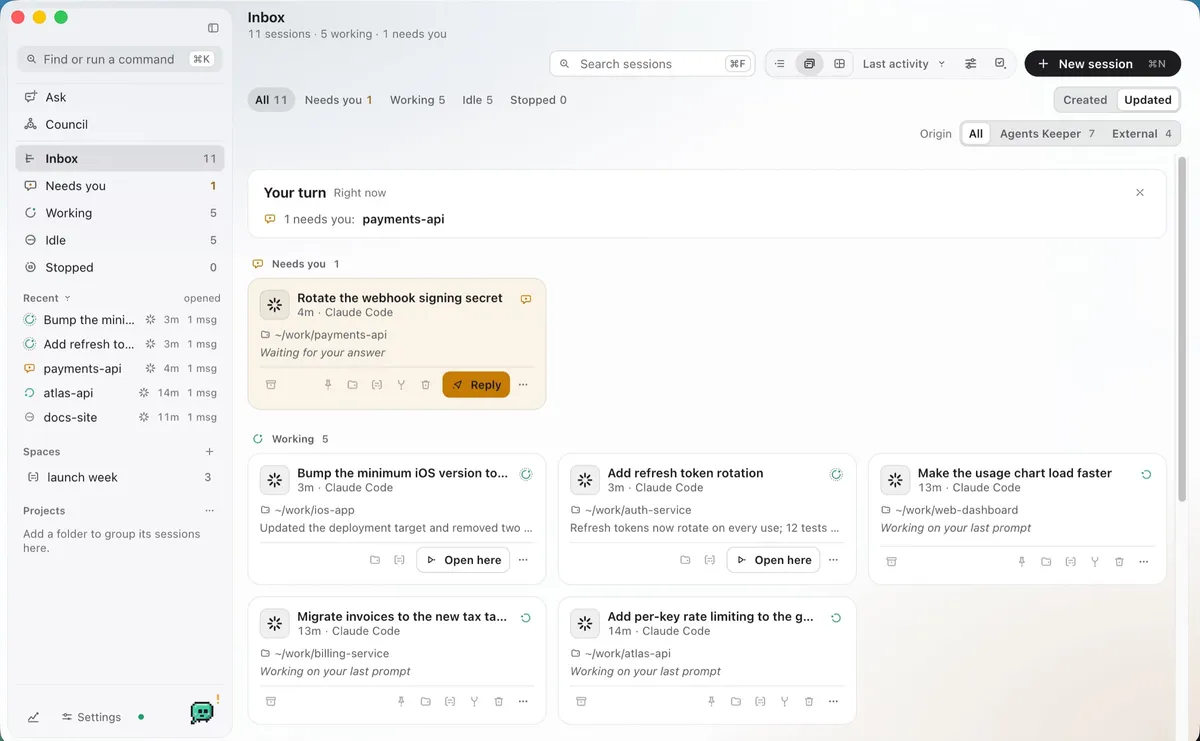
It uses the Claude Code installed natively on Windows, the way this page explains. The older WSL2 version of the app stays available as a legacy download. More in Agents Keeper on Windows and the Windows install guide; for Codex, see Codex CLI on Windows.
Questions about Claude Code on Windows
- Can I use Claude Code on Windows without WSL?
- Yes. As of November 2026, Anthropic's setup docs list native Windows as an option: run
irm https://claude.ai/install.ps1 | iexin PowerShell, no administrator rights needed. WSL2 is only required if you want sandboxed commands. - Which Windows versions does Claude Code support?
- Windows 10 version 1809 or later and Windows Server 2019 or later, on x64 or ARM64, with at least 4 GB of RAM.
- Do I need Git for Windows?
- No, it's optional but recommended. With it, Claude Code uses Git Bash for shell commands; without it, it uses PowerShell.
- Why does
claudesay it isn't recognized after installing? - The install folder isn't on your PATH in that window yet. Open a new terminal and run
claude --version; if it still fails, Anthropic's troubleshooting page covers fixing the PATH. - How do I uninstall Claude Code on Windows?
- For the native install, delete
claude.exefrom%USERPROFILE%\.local\binand the%USERPROFILE%\.local\share\claudefolder (the PowerShell commands are in “Update or uninstall” above); for WinGet, runwinget uninstall Anthropic.ClaudeCode. Your settings in%USERPROFILE%\.claudestay until you delete them. - Is Claude Code free on Windows?
- No. It needs a paid Claude plan (Pro, Max, Ultra, Team or Enterprise) or a Console account with API billing; the free claude.ai plan doesn't include it.
- Does Agents Keeper work with a native Windows install of Claude Code?
- Yes. Since version 0.5.2 (November 13, 2026), Agents Keeper runs natively on Windows and uses the Claude Code installed there; Setup offers to install it if it's missing. Agents Keeper itself is a free beta with no account.
Sources
Checked on